Architecture of CancerImmunoDB
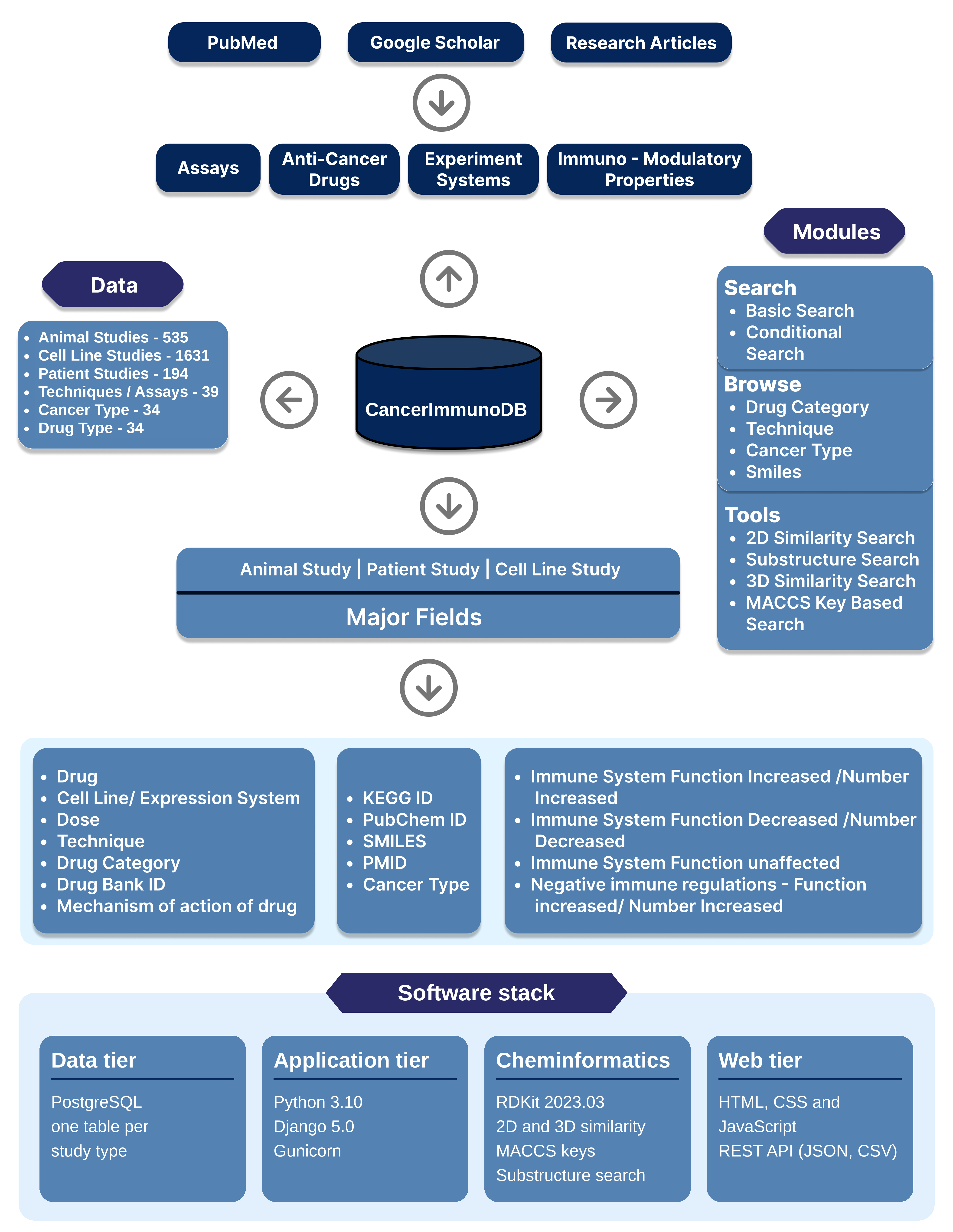
Brief Description of all the fields in CancerImmunoDB
| Field Name | Description |
|---|---|
| Drug | Specifies the name of the drug as reported in the original research article. |
| Drug Category | Specifies the pharmacological or therapeutic category to which the drug belongs. |
| DrugBank_ID | Provides the unique identifier assigned to the drug in the DrugBank database. |
| Target/s or Mechanism of Action | Describes the molecular target(s) of the drug and/or its mechanism of action. |
| KEGG Drug ID | Provides the unique identifier assigned to the drug in the KEGG DRUG database. |
| Drug_PubChem | Provides the PubChem Identifier associated with the drug in the PubChem database. |
| STR_Link (SMILES) | Provides the Simplified Molecular Input Line Entry System (SMILES) representation of the drug. SMILES is a line notation that encodes the molecular structure of a chemical compound as a sequence of ASCII characters, enabling its representation and computational processing. |
| PMID | Provides the PubMed identifier (PMID) of the original research article from which the information was curated. |
| Cell Line / System | Specifies the cell line, experimental model, or biological system used in the study. |
| Technique | Specifies the experimental assay or technique used to investigate the anticancer and/or immunomodulatory effects of the drug. |
| Immune System – Function Enhanced / Numbers Increased | Describes the immune components whose functional activity or abundance increased following drug treatment, contributing to enhanced antitumour immunity. |
| Immune System – Function Inhibited / Numbers Decreased | Describes the immune components whose functional activity or abundance decreased following drug treatment, potentially resulting in reduced antitumour immunity. |
| Immune System – Function Unaffected | Identifies the immune components whose functional activity or abundance remained unchanged following drug treatment. |
| Negative Immune System Regulation – Function Enhanced / Numbers Increased | Describes the immune components whose functional activity or abundance increased following drug treatment, potentially contributing to the suppression of antitumour immunity. |
| Animal Strain Used | Specifies the animal strain used in in vivo experiments to investigate the anticancer and/or immunomodulatory effects of the drug. |
| Cell Line Used to Induce Tumour in Mice | Specifies the tumour cell line used to establish the tumour model in mice for evaluating the anticancer and/or immunomodulatory effects of the drug. |
| Patient_Sample | Specifies the number of patient-derived samples analysed in the study, wherever applicable. |
We appreciate the direct and indirect assistance that researchers provided in the creation of CancerImmunoDB. We express our gratitude to the creators of the resources listed below.
| Resources | Description |
|---|---|
| DrugBank | A comprehensive, publicly accessible database that provides detailed information on drugs, their chemical properties, targets, interactions, and related pharmacological data. |
| KEGG | The Kyoto Encyclopedia of Genes and Genomes (KEGG) is a collection of databases containing information on genomes, biological pathways, diseases, drugs, and biological systems. |
| PubChem | PubChem is a publicly accessible chemical information resource that provides data on chemical structures, properties, identifiers, and biological activities. |
| PubMed | PubMed is a biomedical literature resource that provides access to citations and abstracts from MEDLINE, life science journals, and online books. |
| PostgreSQL | PostgreSQL is used as the database management system for backend data operations, including data storage, organization, management, and retrieval. It supports efficient data manipulation and querying within CancerImmunoDB. |
| Python | Python is used for backend processing, while the Django web framework connects the web interface to the database. Backend application logic and database interaction scripts are implemented using Python. |
| HTML, CSS, and JavaScript | The frontend of the CancerImmunoDB web interface is developed using HTML, CSS, and JavaScript to structure, style, and support interactive functionality. |
FAQs (Frequently asked questions)
Q1.What is CancerImmunoDB ?
Ans.CancerImmunoDB is a manually curated resource for studying the tumor specific anti tumor response of anticancer agents/Drugs. This Database provides information on Immune components whose number or function changed as a result of drug treatment..
Q2. What are anticancer drugs ?
Ans. Anticancer drugs, commonly referred to as antineoplastic or chemotherapeutic drugs, are compounds utilised to combat cancer by impeding the proliferation of malignant cells. These medications are specifically engineered to selectively attack and destroy cancer cells while minimising harm to healthy cells. However, the treatments' non-specific mechanism of action typically leads to considerable side effects, which are a cause for concern.
Q3.Why CancerImmunoDB database is created ?
Ans. Response of a patient to any anti-cancer therapy depends upon interaction of tumor microenvironment with drugs and subsequent immune-modulation-(both positive and negative). This immune-modulation may alter the immune associated parameters- cell types, phenotypes and function of host immune system (Coffelt et al, 2015). These immune associated parameters have prognostic value and can be an important predictive factor in the disease outcome and survival (Zitvogel et al, 2015). For example-CD16+ myeloid cell infiltration in colorectal cancer is associated with better overall survival even after adjusting for other prognostic factors (Sconocchia et al, 2011).Also, cytotoxic cell infiltration in Hodgkin’s lymphoma as a prognostic factor correlates with decreased overall survival (Alvaro-Naranjo et al, 2005). These immune associated parameters can be identified and clinically exploited for the therapeutic intervention in the form of personalized medicine. This is a effort for cataloguing the available information from research articles for studying immune system interaction with cancer drugs and identifying immune componets whose function/ number changed in response to drugs.
Q4. What is unique about this CancerImmunoDB resource ?
Ans. To the best of our knowledge, this is first dedicated web based computational resource for studying immune system interaction with cancer drugs & cataloguing the immunomodulation (by anticancer drugs) information in a structured way in different systems : Cell line, Animal and Patients. The resource's structured data can assist in creating more effective combinatorial treatment plans by examining the immunomodulatory properties of individual drugs. This resource has a tool by which a user having the SMILES information of a query compound, can perform various types of similarity searches against the SMILE information of drugs listed in this database. Drug listed in this resource is linked with Drug bank, KEGG and PubChem database which will provide comprehensive information on the available drugs listed in this database.This database also provides the available 3D structure of all the listed drugs.
Q5. Does this database catalogued all the available information from research articles for studying immune system interaction with cancer drugs and identifying immune components whose function/ number changed (Immunomodulation) in response to drug ?
Ans. The first round of curation produced this database, and in order to create an extensive library, further article are being constantly searched..
Q6. Whom do I contact if there is an error/discrepancy?
Ans. Please email us at parveenpunia1987@yahoo.in
Q7. Is this database useful if users have their own SMILE seq?
Ans. Yes. This resource has a tool by which a user having the SMILES information of a query compound, can perform various types of similarity searches against the SMILE information of drugs listed in this database.
Statistical information about CancerImmunoDB
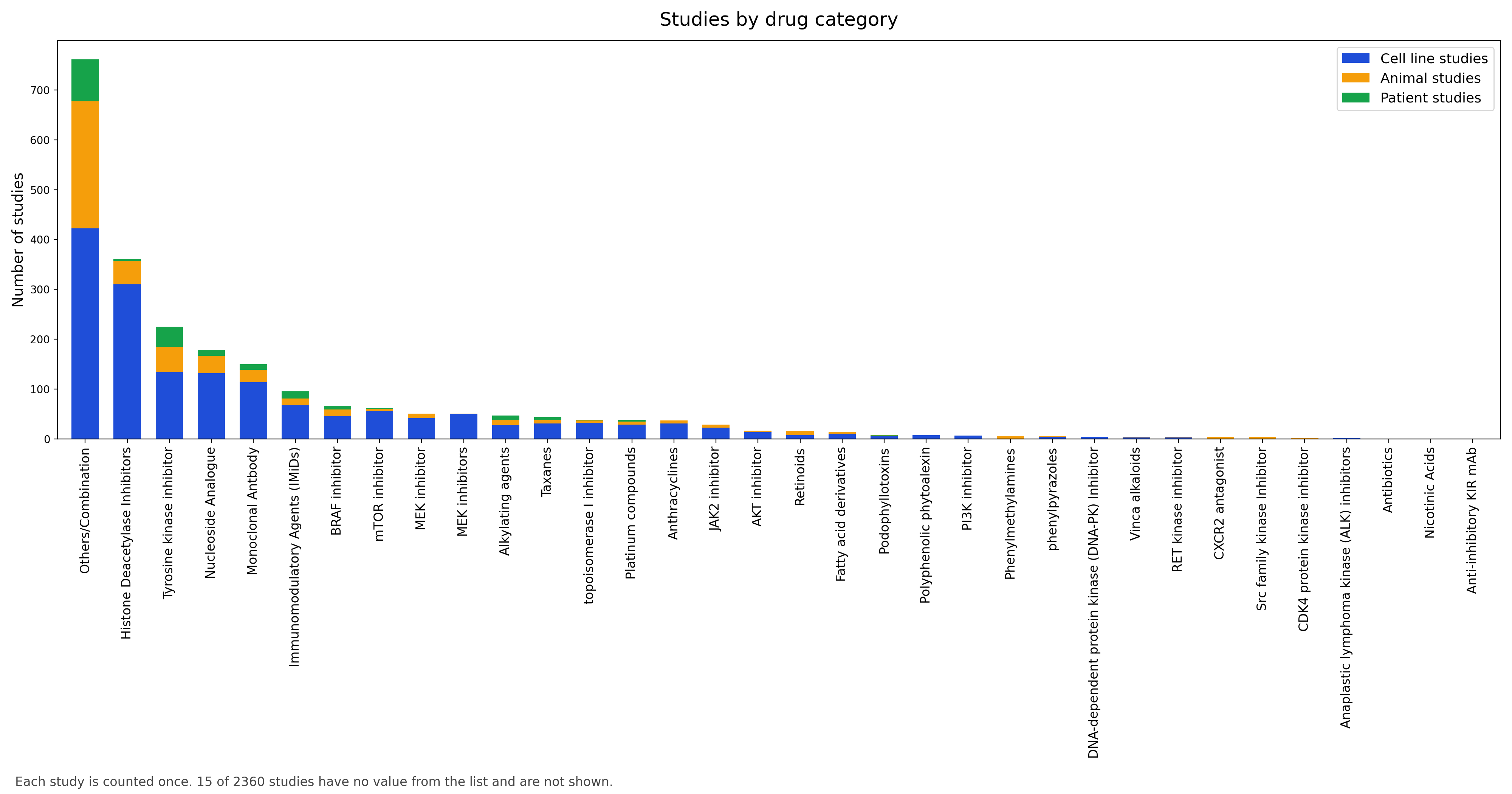
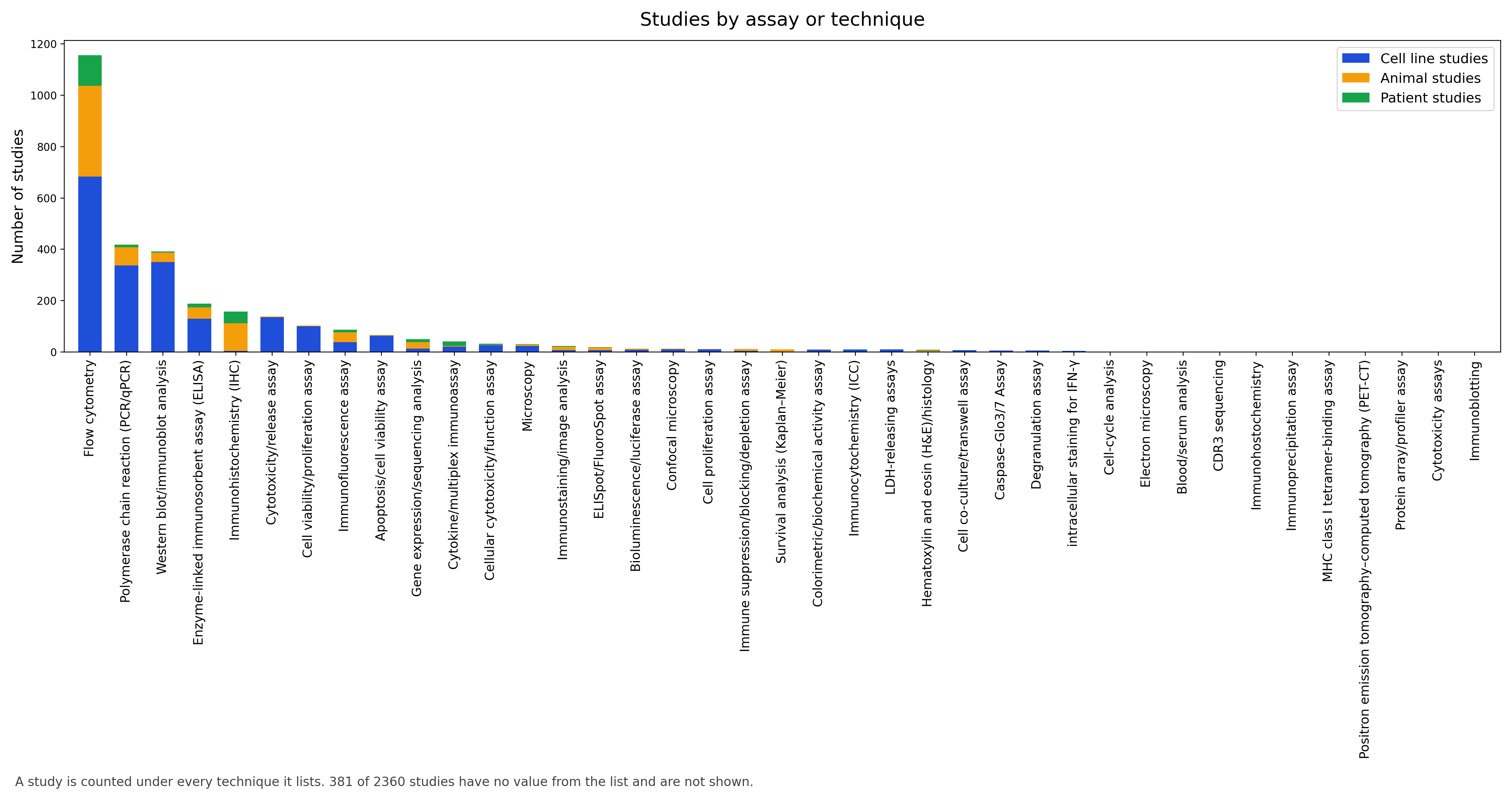
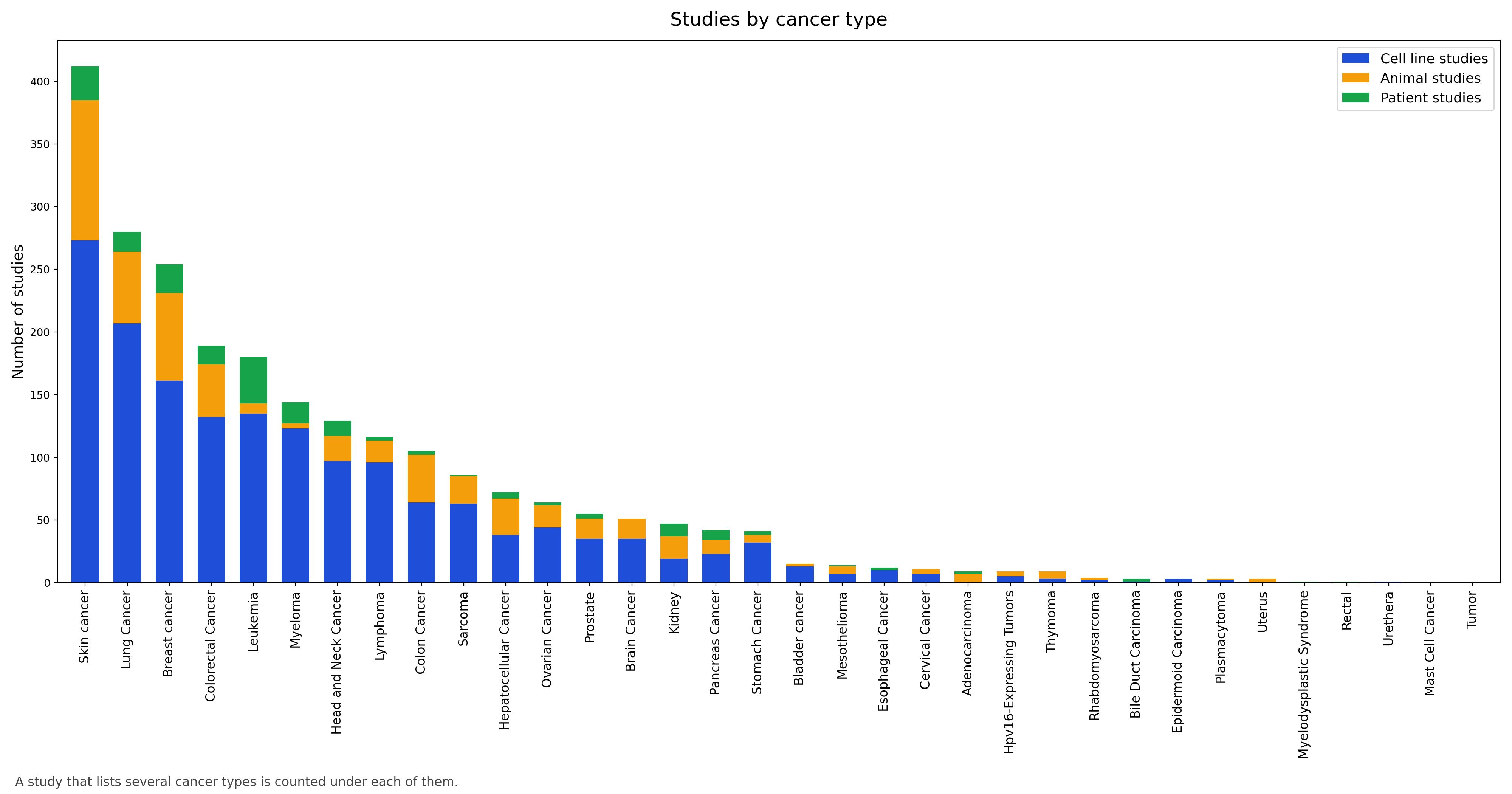
Download & API
Every entry can be downloaded in a single file, and every search is available as a REST API that returns JSON or CSV. No registration or key is needed, and results match the website.
Download the whole dataset
| Study type | Entries | CSV | JSON |
|---|---|---|---|
| Cell line studies | – | cell_line.csv | cell_line.json |
| Animal studies | – | animal_studies.csv | animal_studies.json |
| Patient studies | – | patient_studies.csv | patient_studies.json |
All studies (adds a study_type column) | – | all.csv | all.json |
Each file has one row per study with every field exactly as stored, including the curation notes. For the full dataset, download a file rather than paging through the API.
Use it from the command line
# the first 5 patient studies that mention gemcitabine, as JSON
curl "http://www.canimmuno.online/api/v1/studies/patient_studies/?Drug=gemcitabine&limit=5"

# the whole cell-line table as CSV
wget -O cell_line.csv "http://www.canimmuno.online/api/v1/download/cell_line.csv"

# structures similar to gemcitabine (Morgan fingerprint, Tanimoto 0.7 or higher)
curl -G "http://www.canimmuno.online/api/v1/similarity/" \
     --data-urlencode "smiles=NC1=NC(=O)N(C=C1)[C@@H]1O[C@H](CO)[C@@H](O)C1(F)F" \
     -d method=2d -d threshold=0.7
Use it from Python or R
# Python
import pandas as pd
df = pd.read_csv("http://www.canimmuno.online/api/v1/download/all.csv")

# R
df <- read.csv("http://www.canimmuno.online/api/v1/download/all.csv")
Endpoints
| Endpoint (GET) | What it returns |
|---|---|
/api/v1/studies/{study_type}/ | Studies as JSON, or CSV with format=csv. study_type is cell_line, animal_studies or patient_studies. Filter on any field with ?Field=value (field names are not case-sensitive) (a partial, case-insensitive match; add exact=true for whole values), search every field with q=text, and page with limit (up to 1000) and offset. |
/api/v1/download/{study_type}.{csv|json} | The complete table in one file. Use all instead of a study type for the three tables together. |
/api/v1/similarity/ | Structure search. smiles is required; method is 2d (default), maccs, substructure or 3d; study_type defaults to cell_line; threshold is 0 to 1 (default 0.5); limit caps the rows returned. The response has the full records, the score, and a summary of how many entries were searched. 3D searches take several seconds. |
/api/v1/fields/ | The field names of each table. |
/api/v1/status/ | A health check with the number of entries in each table. |
Errors come back as JSON with an error message and, where it helps, the list of valid values. The API is read-only and answers GET requests only; it can be called from any website.
Data Submission Page
This page allows users to submit their data, including information about an anticancer drug, to the database. All user-submitted entries will be evaluated by the team before being added to the database. For online submission, users need to provide the following information. For more details, see the HELP page.
Developers

Parveen Punia
Research Scholar,M.D University,Rohtak

Avinash Mishra
CEO,Growdea Technology,Gurugram

Plácido Rogério Pinheiro
Graduate Program in Applied Informatics, University of Fortaleza

Dr. Meenu Kalkal
Research Scientist,ICMR-NIMR

Dr. Ashish Khanna
Associate Professor, Maharaja Agarsain Institute of Technology, Delhi.

Akshat Jha,
Product Development Lead,Growdea Technology,Gurugram

Sonia Kapoor,
Professor,Department of Biotechnology, University Institute of Engineering and Technology, Maharshi Dayanand University, Rohtak

Salman Sadullah Usmani 1,2,
1Decode Life,Haryana,India 2 Albert Einstein College of Medicine,New York,USA
Address for Correspondence
This Database was developed by the Lab of Dr. Sonia, Professor, Department of Biotechnology, University Institute of Engineering and Technology,Maharshi Dayanand University, Rohtak
Dr. Sonia,
Professor,Department of Biotechnology,
University Institute of Engineering and Technology,
Maharshi Dayanand University, Rohtak
Feedback Form
Help
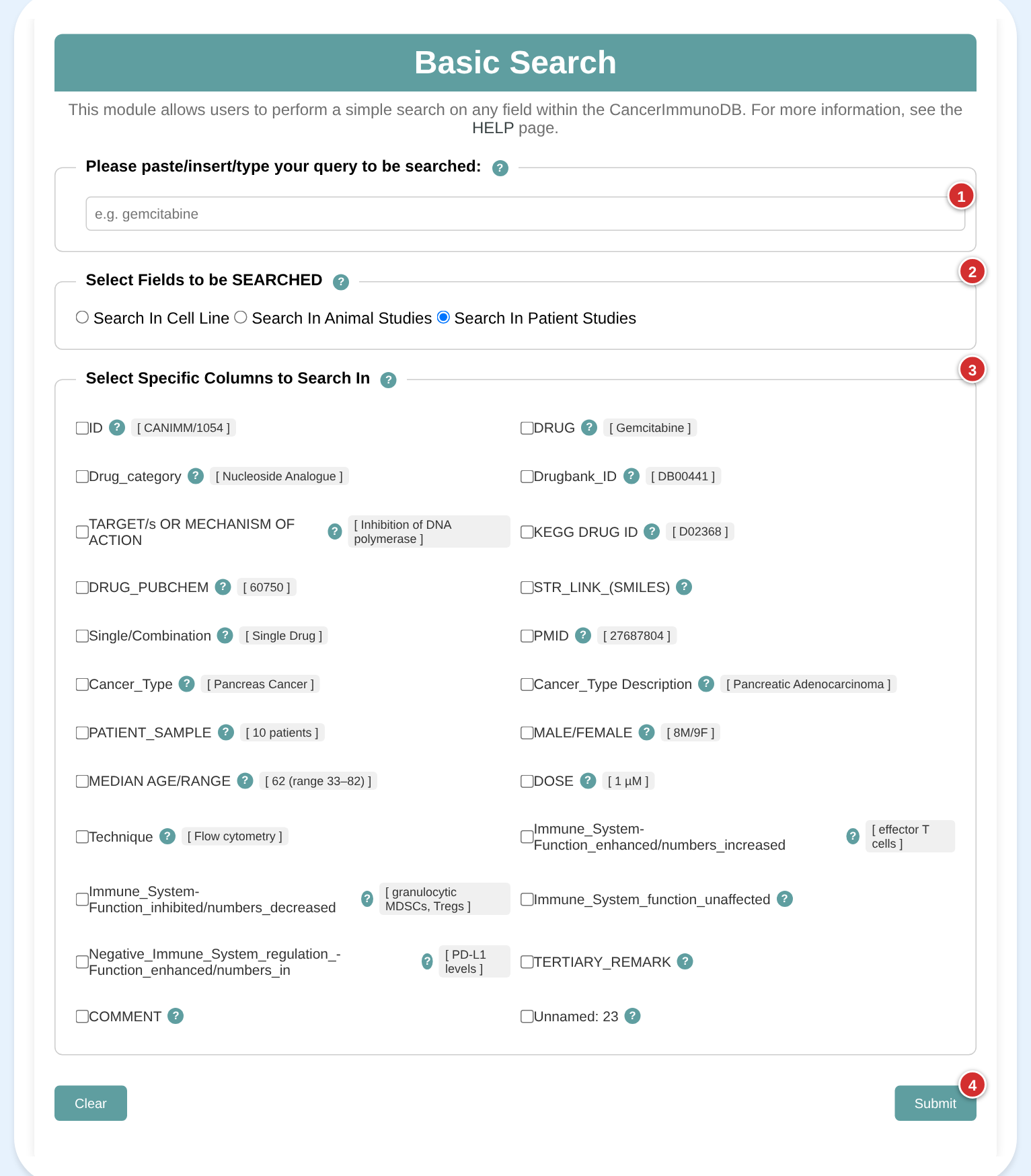
Pick a search on the left. Its screenshot appears on the right, and the numbered steps match the numbers on the screenshot.
Related Database content goes here.
Welcome to CancerImmunoDB
CancerImmunoDB is a manually curated resource which provides comprehensive information on immunomodulatory effects of anticancer drugs and antineoplastic agents. This database has compiled experimental verified information like antitumor and pro-tumor immunomodulation by anticancer drugs. This information of change in immune associated parameters has prognostic value and a thorough understanding of them can help create novel combinatorial regimens with enhanced clinical efficacy .The database's entries are connected to Pubchem, KEGG, Drugbank, and Pubmed. With several databases integrated into a single resource, users can browse vast information on a single platform. All data can also be downloaded in full and queried through a REST API: see Download & API.
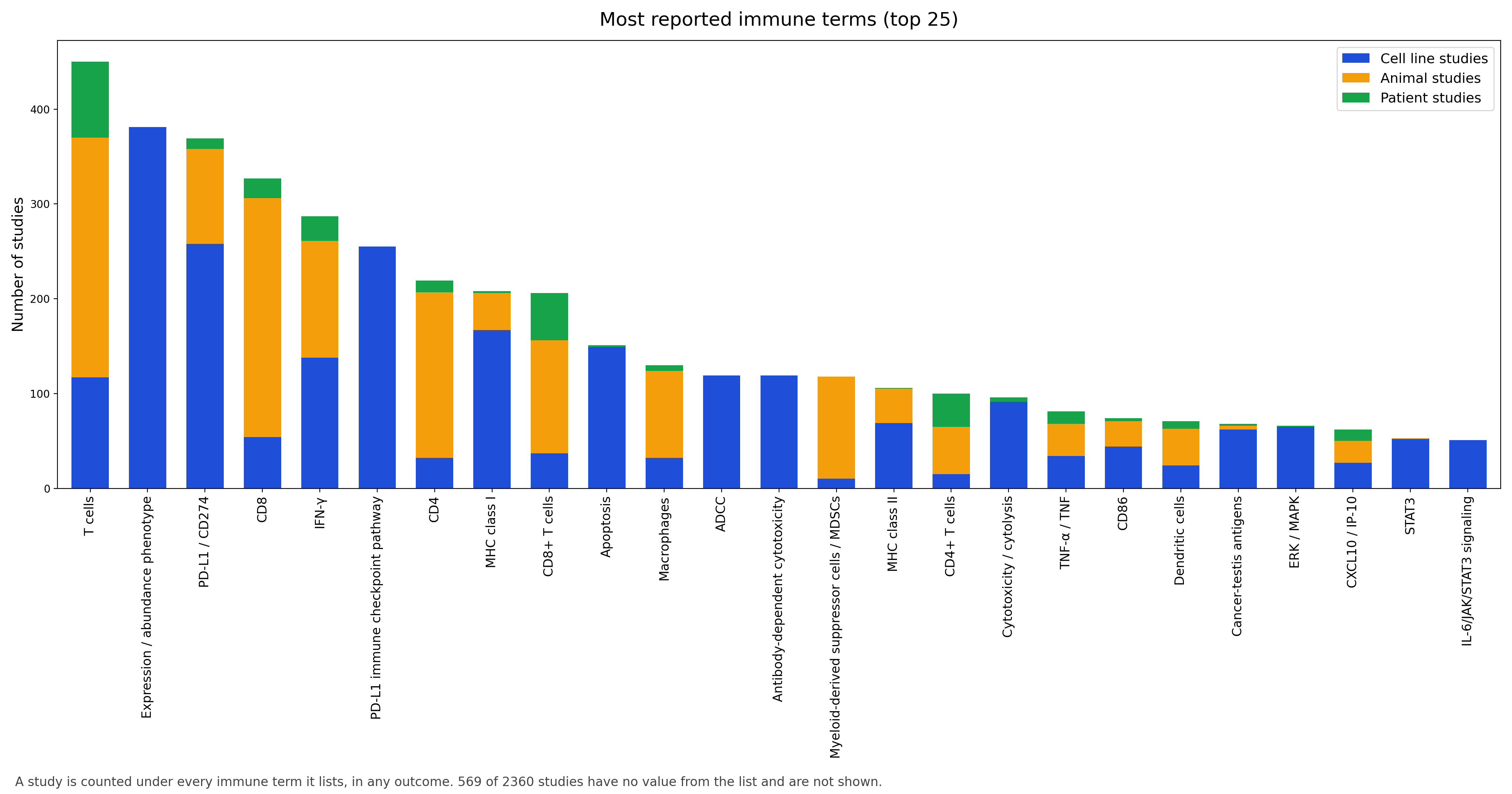
Click a title to show its figure. A study can be counted under more than one assay or cancer type, so the bars do not add up to the total number of studies.
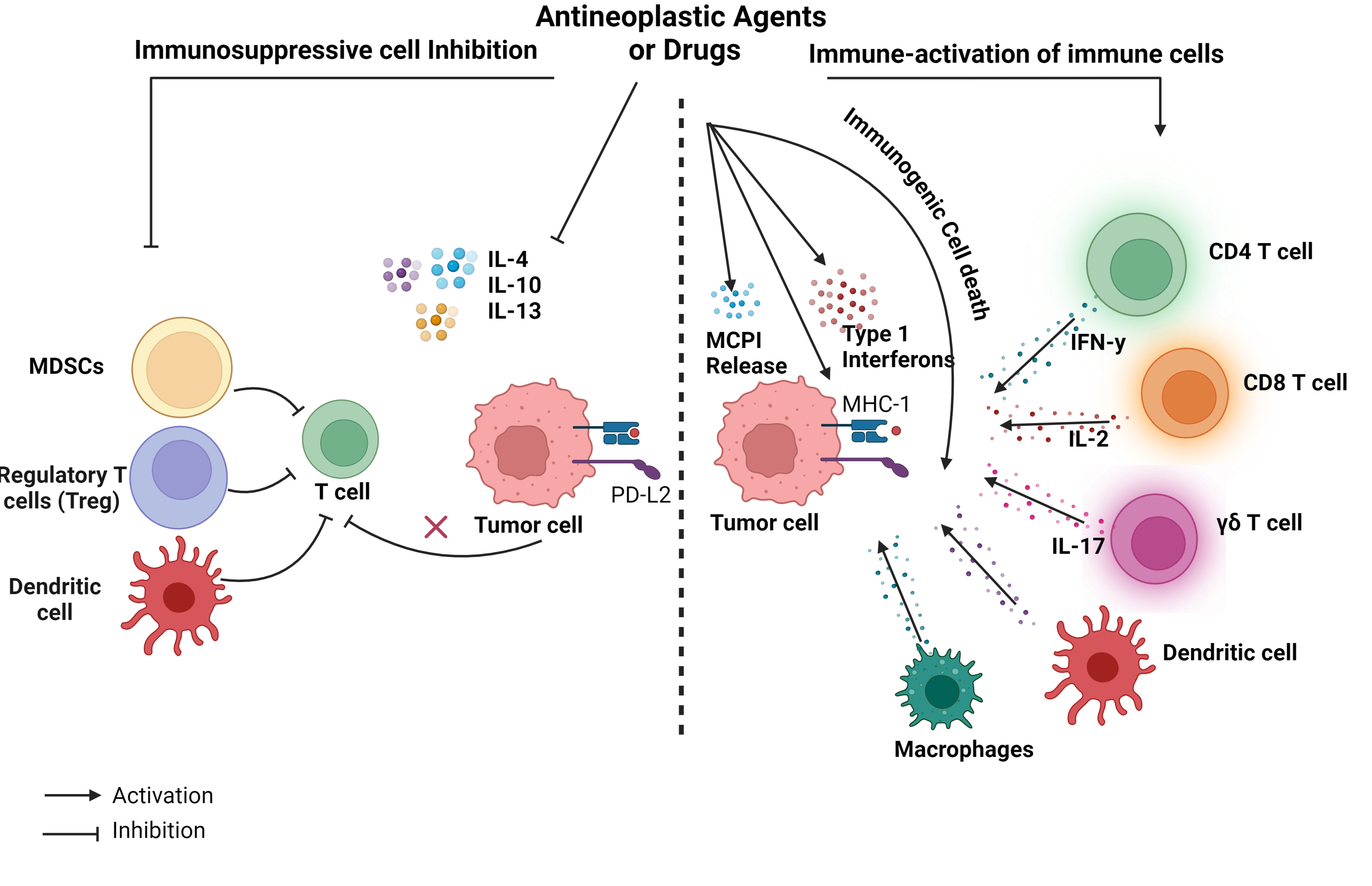
Immunomodulation by anticancer drugs/agents (figure 1)
Anticancer agents/drugs can alter immune associated parameters- cell types, phenotypes and function of the host immune system.The Mechanisms (figure 1) by which anticancer agents alter immune function include depleting immunosuppressive populations (both in circulation and tumor infiltrating) such as myeloid-derived suppressor cells (MDSCs) and Regulatory T cells. and downregulating PD-L2 mediated immunosuppression.These anticancer agents can trigger immunogenic cell death and antibody-dependent cellular cytotoxicity (ADCC). Anticancer agents induce various effector cell populations including tumor specific IL-17–producing γδ T cells , IFN-γ producing CD8 T cells, CD4+ T helper 17 (Th17), Natural killer cells, dendritic cells , macrophages and B cells. Anticancer agents suppress Protumor cytokines including IL-4, IL-10, and IL-13 and induce anti tumor immune response by releasing MCP-1, IFN-gamma, IL-17, Upregulating Class I and Class II MHC expression on tumor. In addition to these, many other mechanisms are cataloged in this database.
2D Similarity Search
The 2D Search page assists users in running a 2D similarity search against the database. After submitting a job, it returns a list of compounds similar to the query structure. The server provides options to select different parameters, such as similarity cutoff and search type. For more information, see the HELP page.
How this search works
- Fingerprint
- Morgan (circular) fingerprint, radius 2, 2048 bits.
- Similarity
- Tanimoto coefficient, from 0 (nothing shared) to 1 (identical fingerprints).
- Threshold
- Minimum score to report (default 0.5). Results are sorted from most to least similar.
- Software
- RDKit.
- Coverage
- Only entries with a valid single-molecule structure are searched. Blank, unparsable and multi-drug (combination) entries are skipped, and each search reports how many.
Search Results
3D Similarity Search
The 3D Search page assists users in running a 3D similarity search against the database. After submitting a job, it returns a list of compounds similar to the query structure. The server provides options to select different parameters, such as similarity cutoff and search type. For more information, see the HELP page.
How this search works
- Reference structures
- 3D models built with RDKit (conformer embedding followed by UFF optimisation). Entries added later are modelled on demand if they have 50 or fewer heavy atoms.
- Query
- Up to 10 conformers (5 for molecules above 40 heavy atoms) generated with RDKit ETKDGv3, pruned at 0.5 Å RMS and UFF-optimised. Queries above 70 heavy atoms are not accepted.
- Alignment
- Each query conformer is aligned onto each reference structure with Crippen-O3A (RDKit).
- Score
- Shape Tanimoto of the aligned pair, from 0 to 1; the best conformer is reported. Unrelated structures typically score around 0.35–0.4, so the default threshold is 0.5. A flexible molecule can score below 1 even against itself, because only one stored conformer is compared; lower the threshold (for example to 0.4) for looser matches.
- Run time
- Typically 5–15 seconds, longer for large molecules.
- Coverage
- Only entries that have a 3D model are searched. Blank, unparsable, multi-drug (combination) and very large structures are skipped, and each search reports how many.
Search Results
Substructure Search
The Substructure Search page helps users find compounds in the database that contain the query substructure. After submitting a job, it returns a list of compounds that match the query substructure. The server provides options to select different parameters, such as search type. For more information, see the HELP page.
How this search works
- Matching
- A database structure is returned if it contains your query as a substructure (RDKit HasSubstructMatch). Atoms are matched by element and bond type; stereochemistry and hydrogen counts are not considered, so a query containing [nH] also matches N-substituted indoles.
- Query
- A SMILES fragment, for example c1ccccc1 for a benzene ring.
- Software
- RDKit.
- Coverage
- Only entries with a valid single-molecule structure are searched. Blank, unparsable and multi-drug (combination) entries are skipped, and each search reports how many.
Search Results
MACCS Key-Based Similarity Search
The MACCS Key-Based Search page helps users perform a similarity search against the database using MACCS keys. After submitting a job, it returns a list of compounds similar to the query structure based on MACCS key similarity. The server provides options to select different parameters, such as similarity cutoff and search type. For more information, see the HELP page.
How this search works
- Fingerprint
- The 166 public MACCS structural keys.
- Similarity
- Tanimoto coefficient, from 0 (nothing shared) to 1 (identical key sets).
- Threshold
- Minimum score to report (default 0.5). Results are sorted from most to least similar.
- Software
- RDKit.
- Coverage
- Only entries with a valid single-molecule structure are searched. Blank, unparsable and multi-drug (combination) entries are skipped, and each search reports how many.
Search Results
Basic Search
This module allows users to perform a simple search on any field within the CancerImmunoDB. For more information, see the HELP page.
Welcome to Browse by Drug Category Page of CancerImmunoDB
This page provides the information regarding the immunomodulatory properties of anticancer drugs/agents in different Drugs.
| Drug Category | Number of Cell line | Number of Animal Studies | Number of Patient Studies |
|---|
Welcome to Browse by Technique Category Page of CancerImmunoDB
This page provides the information regarding the immunomodulatory properties of anticancer drugs/agents in different Techniques. The assays are grouped under standardised names.
| Technique | Number of Cell line | Number of Animal Studies | Number of Patient Studies |
|---|
Welcome to Browse by Cancer Type Category Page of CancerImmunoDB
This page provides the information regarding the immunomodulatory properties of anticancer drugs/agents in different cancer types.
| Cancer Type | Number of Cell line | Number of Animal Studies | Number of Patient Studies |
|---|
Welcome to Browse by Immune Term Page of CancerImmunoDB
This page lists the standardised immune terms (cells, molecules and pathways) and how many studies report each. Choose which outcome to count: ?
| Immune Term | Number of Cell line | Number of Animal Studies | Number of Patient Studies |
|---|
Conditional Search
This module is designed to facilitate complex searches using multiple queries combined with logical operators such as AND/OR. For more information, see the HELP page.